In our previous discussion, we delved into the intricacies of pricing scenarios within bundled products. Now, let’s shift our focus to explore how promotions come into play within the realm of bundled products.
Promotions provides automated features for organizing, creating, and launching promotional campaigns. Due to the transactional nature of promotions, a sale can be maximized by applying the promotional discount to an order, quote, or opportunity at the time of execution.
In this example, we will examine a product with and without a promotion to gain a deeper understanding of the dynamics at play. Let’s dive right in and explore the fascinating world of bundled product promotions.

Step 1 : Let’s start by adding a product to the cart and then look at the one time total charge i.e $184.97.
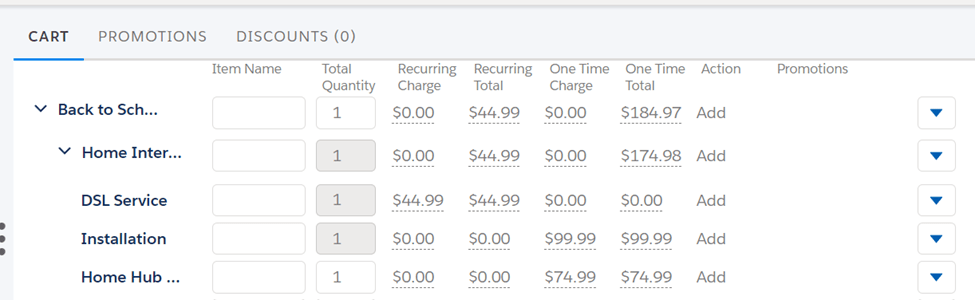
Now we will look at how to create a Promotion and then apply this Promotion to the same product which we added into the cart.
Step 2 : To the right of Promotion in the Dashboard, click new and provide meaningful details to create Promotion such as Name, Code, and Description. Don’t forget to select the Pricelist and make this Promotion active with an effective date; only the Promotion will be available in the cart if you do so.

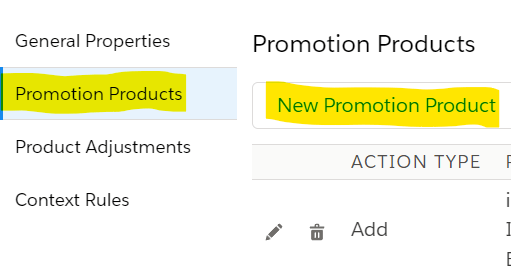
Step 3 : Now that we have created the Promotion, Select the Promotion Products facet and click New Promotion Product to apply the promotion to a product. Choose the Product to which you want to apply the Promotion.
Step 4 : The main step now is to experiment with pricing to determine the promotion. Click the Product Adjustments facet, then click on any child product to open the configuration window. In the configuration window, select the PRODUCT PRICING tab.
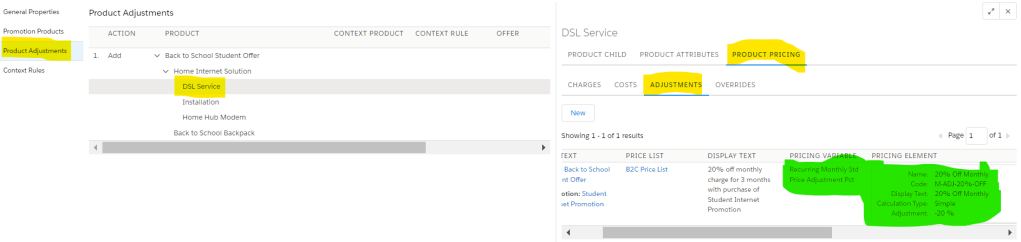
Step 5 : Select the pricing variable and Pricing element value as needed. For example, in this scenario, we need to provide a 20% discount, so I set the Pricing Element section value to 20% Off Monthly.

Step 6 :Don’t forget to save it and return to the cart, where you can select the Promotion and apply it, and bingo, you’ll see the Promotion applied. In the screenshot below, I added the product with and without promotion to demonstrate the pricing difference.

Hope this information helps you guys.
Stay tuned for the next post, in which we’ll go into more detail about pricing scenarios in bundled products.
Cheers!!!
Mukul Sharma
 vlocitysfdc.com