Scenario : Imagine a scenario where, in the process of managing promotions for a product, you inadvertently added two promotions to the same product. Recognizing the need to rectify this oversight, you decide to delete one of the promotions to maintain clarity and efficiency.
However, when you attempt to delete one of the promotions, you encounter an error message that informs you that another promotion is currently associated with the same product. This presents a challenging situation, as you are unable to delete the promotion due to this association.
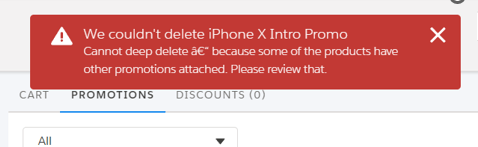

As shown in the screenshot above, we have added two promotions, and if we try to delete one of them by clicking the delete button, we get the error “can’t delete because another promotion is attached.” To get around this, we need to change the settings for deleting promotions.
For deleting promotions, there are two options:
● Shallow delete : The promotion and its modifications (discounts and cardinality) are the only things that are removed when you delete the promotion. The products that are covered by the promotion stay in the Cart.
● Deep delete : Removes the promotion and its changes along with the products pertaining to the promotion. This is the default setting.
Step 1 :In the Vlocity CMT Administration page under Custom Settings, click CPQ Configuration Setup.

Step 2 : Enter Delete in the search bar to find the Delete Services setting.
Step 3 : The DeleteServices option is set to Default. A deep state is the default setting. Change the promotion deletion setting and the Setup Value from Default to No.

After switching the setting from Default to No, proceed to the cart and attempt to remove the promotion. Voila! The error vanishes, and you can successfully delete the promotion.
Hope this information helps you guys.
Stay tuned for the next post, in which we’ll go into more detail about pricing scenarios in bundled products.
Cheers!!!
Mukul Sharma
 vlocitysfdc.com