Utilize the Save Options property of OmniScript to allow users to save and resume running OmniScripts. Users have the option to email links, launch saved instances from object pages, or bookmark URLs. Create unique URLs to restore OmniScript instances that have been saved in separate domains. For example, a customer can initiate an OmniScript inside of a Community, and then a customer service representative can resume the OmniScript inside of the Service Console.
Following are the steps to Enable users to Save and Resume OmniScripts by configuring the Save for Later functionality.
Step 1 : Once you created an Omniscript then click on Setup.
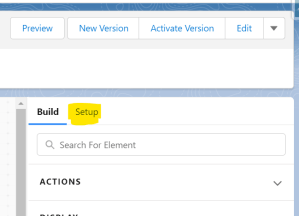
Step 2 : In Setup panel, search for the Save Options section.
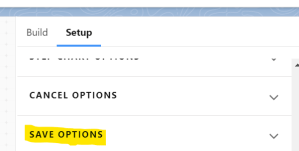
Step 3 : Click Allow Save For Later to enable the Save For Later feature.

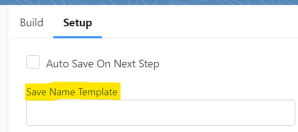
Step 4 : By selecting Auto Save on Step Next, you may enable steps to save an instance whenever a user clicks the Next button.
Step 5 : In the Save Name Template field, enter a name for the OmniScript instance. This field supports merge fields—for example, %LastName%, %FirstName% – Application. If this field is left blank, the default is Saved-OmniScript Name-[RowId].
Step 6 : Enter a number to specify the number of days the OmniScript instance should be accessible in the Save Expire In Days area.

Step 7 : To associate the Saved OmniScript instance with a record, set the Save Object ID field. The default value is %ContextId%. This field supports merge fields.

Step 8 : By selecting Merge Saved Data JSON into updated OmniScript, users will be able to combine data into an updated OmniScript.Users who access a saved instance without having the option enabled will begin with the beginning of the most recent version of the OmniScript.
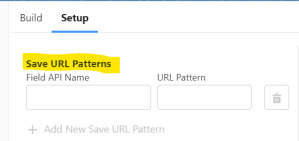
Step 9 : Map the OmniScript instance URL to a custom field in an object in the Save URL Patterns section.
Note :
When an OmniScript is Activated, it generates a unique LWC making saved OmniScript instances of the previous version unusable. If Merge Saved Data JSON into updated OmniScript is enabled, when a saved instance launches, the OmniScript merges the data from the saved instance into the updated OmniScript.
Hope this information helps you guys.
Cheers!!!
Mukul Sharma
 vlocitysfdc.com