We discussed In-Flight Amendments and Supplemental Orders in the previous post, so let’s pick up where we left off. Let’s explore certain possible scenarios in which you can use supplemental orders.
You can change an in-flight supplemental order using the In-Flight Order Amendment feature. When you submit a supplemental order to OM but want to change it before it is fulfilled, the order is said to be in-flight.
Supplemental orders can be used in situations such as :
Scenario 1 :
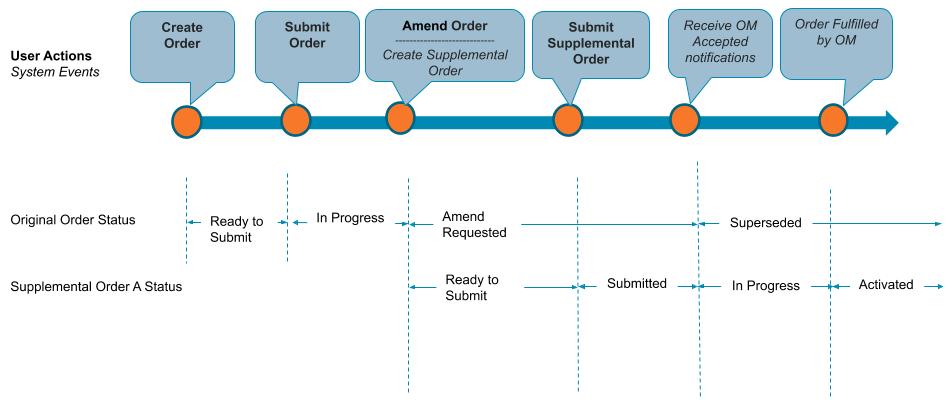
You want to make changes to an order that has already been submitted. When you change the order, Industries CPQ generates a supplemental order with the status Ready-to-submit. When you resubmit the order after making changes, the original in-flight order is superseded and the supplemental order is activated in Industries Order Management.
img source : Salesforce
Scenario 2:
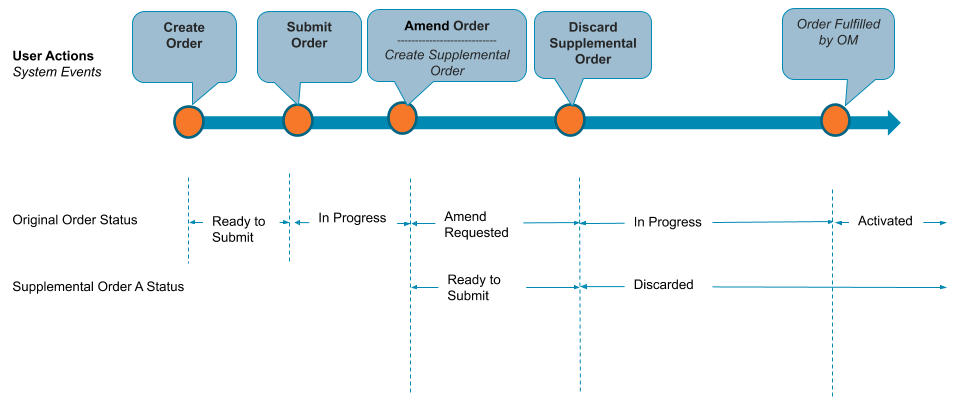
You want to revise a previously submitted order but later decide not to. When you change the order, Industries CPQ generates a supplemental order with the status Ready-to-submit. If necessary, you can cancel the supplemental order after you submit it. When you cancel a supplemental order, the original order status returns to In-Progress.
img source : Salesforce
Scenario 3:
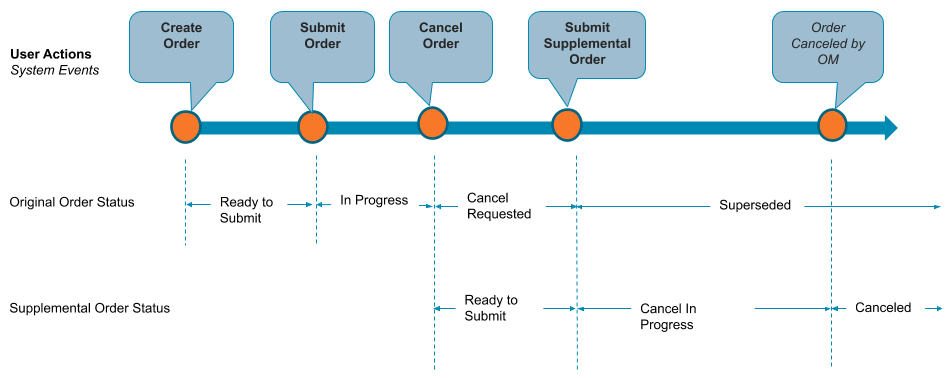
You created an order, but after you submitted it, you want to cancel it. Industries CPQ creates a supplemental order with a cancel-request in progress when you cancel the original order. The initial in-flight order is replaced when you confirm the cancellation, and the initial order is cancelled.
img source : Salesforce
These are the few scenarios in which Supplemental orders can be used. Let’s delve into Follow-On Orders further to uncover any additional insights and nuances.
Follow-On Orders
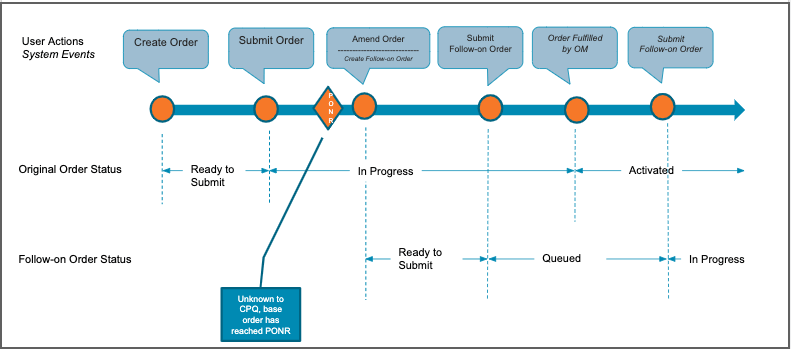
You can no longer modify an in-flight order or order items after they have passed PONR. When an order line item passes PONR, it becomes greyed out and cannot be changed. Industries CPQ generates a follow-on order in this case. A follow-on order records the changes you want to make after the original order has been fulfilled. When you place a follow-on order, it is queued in CPQ until the original order is fulfilled, at which point it is processed by Order Management.
img source : Salesforce
Hope this information helps you guys.
Stay tuned for the next post, where we’ll dive deeper into this topic!
Cheers!!!
Mukul Sharma
 vlocitysfdc.com