Supplemental Orders
When you modify or cancel an in-flight order that has not yet passed point of no return (PONR), Industries CPQ creates a new order called a supplemental order. For instance, the order status changes to in-progress when you submit an order in the Industries CPQ Cart so that OM can continue processing it. However, Industries CPQ creates a supplemental order if you want to make changes to the order you submitted, such as changing the color of the iPhone you chose or adding a product. A supplemental order can be changed, discarded, or revoked. The initial in-flight order is replaced by a supplemental order, and after the supplemental order is submitted, Industries CPQ stops processing the initial order.
Industries CPQ creates a supplemental order only if an in-flight order has not passed PONR. When an order passes PONR, you can neither modify nor cancel the order.

img source : Salesforce
You can cancel or modify an order after you submit it. However, it must be in progress and cannot have passed the point of no return (PONR). If Order Management (OM) has already completed the order, you can change it by creating a follow-on order and submitting the changes to be queued until OM completes the original order.
After you create and submit an order, Industries Order Management (OM) processes and completes it, changing the order status to “in-progress.” An original or supplemental order that is submitted but not fulfilled is referred to as an in-flight order. With the In-Flight Amendments feature, you can change or cancel your order as of Winter ’20 and later by using supplemental or follow-on orders.
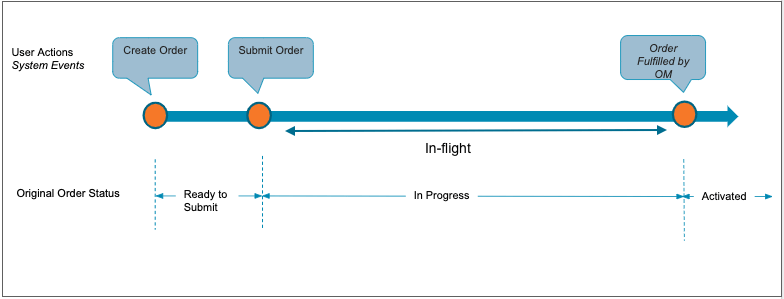
img source : Salesforce
You can change an in-flight supplemental order using the In-Flight Order Amendment feature. When you submit a supplemental order to OM but want to change it before it is fulfilled, the order is said to be in-flight.
Stay tuned for the next post, where we’ll discuss about the scenarios in which we can use supplemental orders!
Hope this information helps you guys.
Cheers!!!
Mukul Sharma
 vlocitysfdc.com