The order pricing flow in Vlocity CPQ (Configure Price Quote) is a process that determines the price of a product or service based on the customer’s requirements and options. The goal of order pricing flow is to speed up the process of configuring and pricing complicated goods and services, ensuring accuracy and consistency while lowering mistakes and lengthening order completion times.
Industries CPQ offers enhancements to the standard Salesforce functionality to support the processing of opportunities, orders, and quotes. Through the use of CPQ, you can transform opportunities into quotes, orders into assets, assets into orders, and quotes into assets. Rules governing availability, eligibility, compatibility, and pricing all have an impact on orders. An object, such as an opportunity, an order, or a quote, is subject to a clearly defined rule.
Industries Order Pricing Flow :
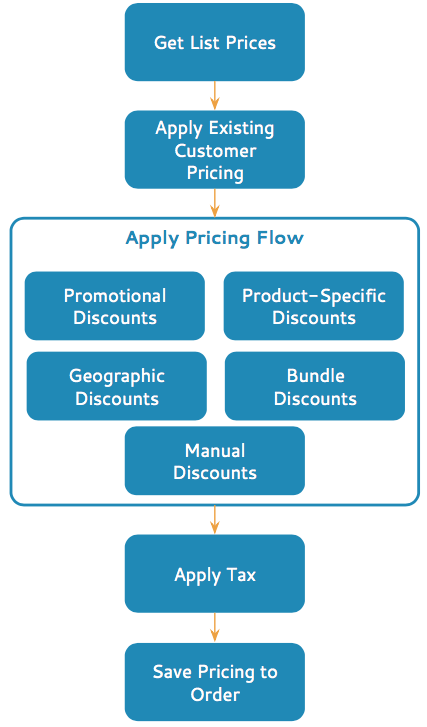
img src : Salesforce
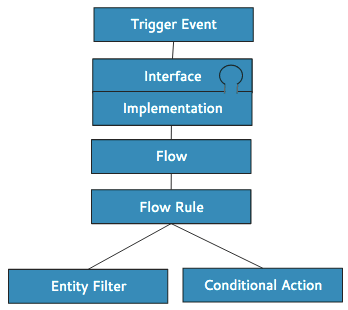
Each process flow contains the following functional components:
img src : Salesforce
Trigger event: It engages the functional stack of the Component Object Model (COM) in conversation. An interface, implementation, or COM class may all be directly triggered by an external or internal trigger event.
Interface/Implementation: An interface is launched by a trigger event, and the active interface implementation is then called. One interface may have several implementations, but only one implementation can be in use at any given time.
Flow: An interface implementation starts a workflow, which is a series of events that includes rules, process logic, and custom processing options. Flows are built with Salesforce flow features in mind. Salesforce extends flows to support the flow of objects like orders and quotes, as well as eligibility, compatibility, and pricing. Branching, embedding, and flow actions are also supported by flows. Flows can be reused.
Flow rule: Rules for availability, eligibility, compatibility, and pricing can be created and implemented. Create rules in natural language so you can remember what the rule does now and in later months.
Entity filter: Entity filters are used by rules to determine which items in the order are subject to the rule action. Depending on the business logic the rule implements, rules can include one or more filters. Entity filters can be reused. As an example, as part of a promotion, you could create a filter that identifies properties with service activation dates of 90 days or less. Once created, the filter can be used in any rule that requires it.
Conditional action: Rule actions define the changes that a rule makes on qualified objects. A rule action can be an offering procedure, a product relationship, a calculation procedure, or another procedure, such as a call to Apex code. Different rule types use different rule actions.
Stay tuned for the next post, where we’ll dive deeper into this topic!
Hope this information helps you guys.
Cheers!!!
Mukul Sharma
 vlocitysfdc.com