Typically, Energy products include an offer with a number of cost components. These are designed as a bundle of several child products that are attached to a parent product. These child products show up in an Order as line items in the Cart.
Few of the child products are tangible items like solar panels or boilers, while others are services like energy usage optimization’s or recurring fees like tariffs. The majority, though, are unit rates for the use of gas, electricity, and other commodities.
For the same commodity, large commercial customers may have different unit prices. Electricity rates, for instance, can differ depending on peak and off-peak hours, seasons, and consumption levels. Each rate is represented as a distinct child product within the same bundle. (When a multi-site customer has different rates for each site, advanced rules remove non-applicable rates for each site.)
For the purpose of simplifying total calculations, usage pricing is applied to unit rates and standing charges. In order to provide your customer with an estimate of cost and the provider with an estimate of revenue, you can forecast usage based on historical consumption or industry-based estimates. Cost and margin or attribute pricing can be combined with usage pricing. Energy & Utilities Cloud product catalogues frequently map to third-party billing, pricing, and other systems. It is essential to maintain these product catalogues in sync.
Let’s see how the parent product bundle for Fixed Energy for Residential Customers appears in the cart.
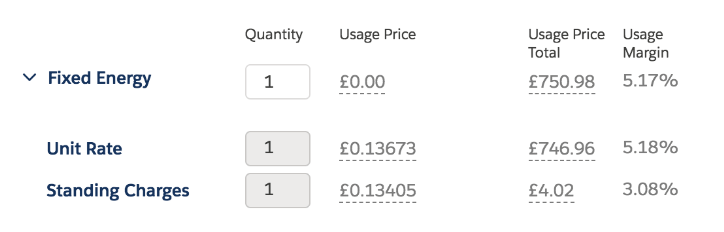
For instance, You have been asked to create a product bundle for residential customers who only require electricity because you work for Lightning Energy. It consists of two child products, Standing Charges and Unit Rate, as well as a parent product called Fixed Energy. A forecast based on an estimate of the electricity usage is used to determine the Usage Price Total for the Unit Rate.
The Fixed Energy parent product bundle appears in the Cart as follows:
img src: Salesforce
Picklists, Attribute Categories, Attributes, Object Types, Product Specifications, and finally the product bundle that combines everything are all necessary to create these products. We’ve already covered these in our Industries CPQ blog post. In case you missed them, here are the links for your convenience.
Product Configuration (Picklist and Attributes) : https://vlocitysfdc.com/2023/01/15/product-configuration-picklist-and-attributes/
Attribute v/s Field : https://vlocitysfdc.com/2023/01/18/attribute-v-s-field/
Product Modelling : https://vlocitysfdc.com/2023/01/23/product-modelling-object-types/
Product specifications and Picklist in EPC : https://vlocitysfdc.com/2023/01/24/product-specifications-and-picklist-in-epc/
Hope this information helps you guys.
Cheers!!!
Mukul Sharma
 vlocitysfdc.com