So far, we’ve discussed what a product is, what the picklist’s role in the product is, and what the attributes are. Today, we’ll look at a scenario which we frequently encounter while product modelling.
Problem Statement
Suppose we have a product named Apple Watch, available in four different color i.e. Red, Blue, Green and Silver. Now the scenario is, if the user selected the watch size 44mm then no need to show the watch of color Silver. How to achieve this ?
The solution for this scenario is to create an attribute rule that removes silver as a color option if the watch is 44mm in diameter.
We must define a condition for the configuration rule based on the Watch Size attribute, which has a value of 44mm. If that condition is met, we must create a Color attribute action that excludes the silver option.
The attribute rule for the configuration is as follows :
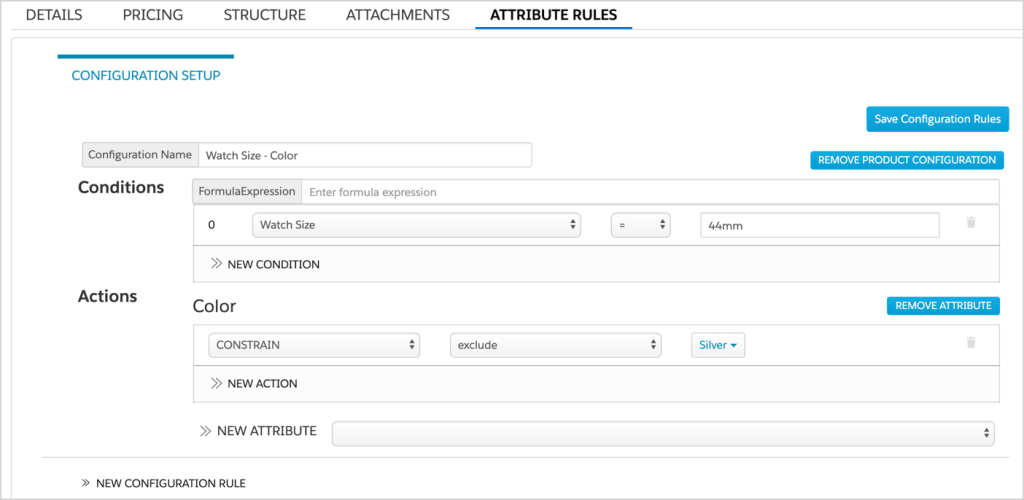
img src : Salesforce
The configuration setup is similar to setting up rules, which include, from left to right:
- index number (for each condition)
- attribute
- operator
- value
The index number is 0 in the preceding example, the attribute is watch size, the operator is the equal sign (=), and the value is 44mm.
Below are the steps to create this rule :
- From the Vlocity Product Designer, click the
 button, and select Products.
 - From the Products list, click an offering or product specification. The product opens in a new tab.
- In the Attribute Rules tab, enter a name for the rule in the Configuration Name field.
- In the Conditions section, click New Condition and define a condition.
- Select an attribute.
- Select an operator.
- Enter a value.
- To create another rule with new conditions and actions, click New Configuration Rule, and repeat the steps.
- When you are finished, click Save Configuration Rules.
We have several actions available, so let’s take a look at them.
| Constrain | includes or excludes specific picklist choices. It is only applicable for attributes in picklists. |
| Assign | defines a value to an attribute. For example, the Color attribute is assigned a value of Red. |
| Disable | makes an attribute that is visible but cannot be modified. |
| Require | indicates that an attribute must be defined, such as the size of a smart watch. |
| Hide | any attribute in the user interface. The attribute definition is in the JSON but is hidden from the user. |
Hope this information helps you guys.
Cheers!!!
Mukul Sharma
 vlocitysfdc.com