The Product can be configured to fit an organization’s unique needs and requirements by customizing fields, pricing rules, and product bundles. Additionally, Industries CPQ (Vlocity CPQ) provides an easy-to-use user interface that enables sales reps to quickly and easily configure products and services.
Picklist and attributes play a very important role in product configuration. So let’s talk about picklist and attributes in Industries CPQ.
Picklist
A picklist in Industries CPQ (Vlocity CPQ) is a type of product configuration option that allows a user to select from a predefined list of values. These values can be used to specify certain characteristics or options for a product, such as color, size, or material. Picklists can be used in conjunction with other types of product configuration options, such as text fields or checkboxes, to provide a comprehensive product configuration experience for users.

Key Points :
- Picklists are intended to be reusable across attributes, products, offers and promotions.
- Name, Code, and Data Type properties are required.
- The picklist’s name is utilized only at design time and not at run time. This means that customers cannot see it.
- Salesforce recommend :
- Use PKL_ naming convention
- Setting the Active flag and Effective From date
Attributes
In Industries CPQ (Vlocity CPQ), product attributes are characteristics or properties of a product that can be used to differentiate it from other products. These attributes can be used to define the product, set pricing, or configure the product during the sales process.
Examples of product attributes might include: Size, Color, Material, Capacity, Warranty, Brand, Model number, Weight, Dimensions etc.
Why Are Product Attributes Important?
- Allows for the powerful and flexible extension of product entities.
- Stored in aggregate “blob” form in the JSON Attribute field on the Product object
- Used extensively throughout Industries CPQ and Industries Order Management (IOM) to:
- Filter products at run-time
- Configure product specifications at run-time
- Change product pricing using attribute-based pricing rules
- In Industries OM, to map commercial products to technical products
General Qualities of the Attribute :
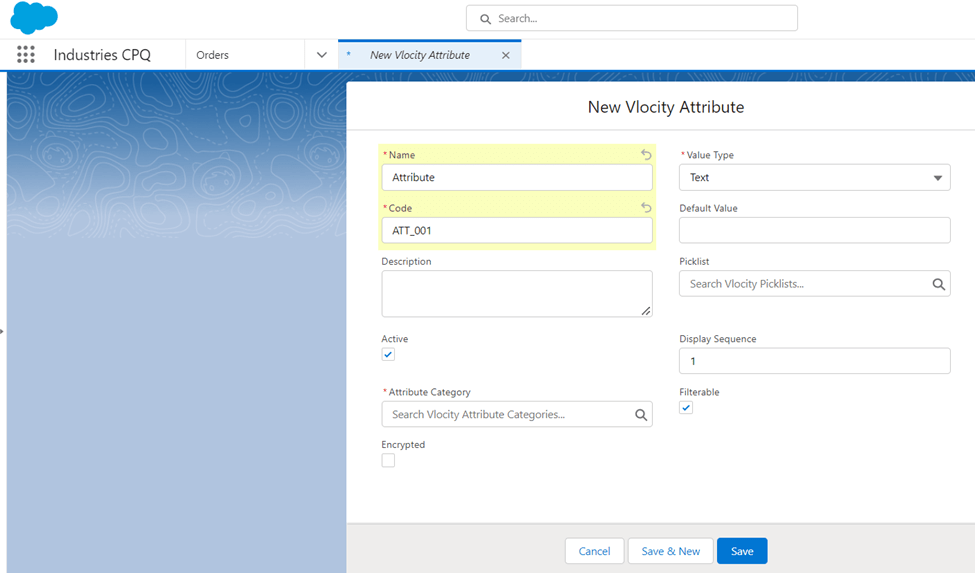
- The Attribute Name is required and visible at run-time so it's important to pick a customer friendly name.
- The Attribute Code is required but not visible at run-time. Salesforce recommend the following naming code convention: ATT_. This makes it easy to identify the EPC element type during design-time.
- The Attribute Category is required and is created through Attribute Categories in the Product Console.
- You can optionally designate a Picklist to provide the values for your attribute.
- Filterable attributes can be used within the Cart to filter product lists and order items.
- You can set your attribute to be encrypted, if it contains sensitive information.
- Product Attributes can be assigned directly to a product or to a product Object Type, which allows it to be inherited.
In the following post, we will go over the Product Object Type and when to use Attributes and when to use Fields.
Hope this information helps you guys.
Cheers!!!
Mukul Sharma
 vlocitysfdc.com
One thought on “PRODUCT CONFIGURATION (Picklist and Attributes)”