As we discussed in the last post about business challenges, So now let’s discuss the possible solutions we have which industries CPQ gives us. The key characteristics that we will learn with practical experience, along with other characteristics, are as follows :
- Configure simple and complex commercial products.
- Product’s pricing using List Price or Attribute Based Price.
- Applying discounts and promotions.
- Generating the Quote documents in DOCX, PPT, and/or PDF format containing your line items.
- Order Management
- Modify the assets by performing an asset-to-order (Move, Add, Change, Delete (MACD)).
So let’s start with product creation, but before that let’s know where this product will be used? And the answer lies in the order capture.
Order Capture :
Order Capture Business Challenges
| Order related difficulty | Businesses try to provide quotes that are accurate and consistent while offering products through various channels based on the same enterprise product catalogue data. Loss of business and order fallout may result from this. |
| The problem of slow sales | Sales teams could be closing deals instead of wasting time quoting product prices. High operational costs and resource wastage follow from this. |
| The problem with customer satisfaction | Customers want quick quotes for the best-fitting products that consider their eligibility and preferences. Customers will shop elsewhere if they don’t get what they want, which will result in lost sales. |
| The problem of product complexity | Businesses frequently produce a large number of intricate products with a wide range of possible incarnations. Order fallout and lost business may result from improperly configured product offers and business rules. |
How Industries CPQ Addresses the above Issues ?
Utilizing the Cart and an asset-based ordering system, Industries CPQ’s order-capture capabilities enable you to manage the selling process and overcome business challenges. In order to secure the ideal customer order, customer service representatives (CSRs) and sales teams can carry out a variety of business tasks through guided selling. With a shared, central single point of truth for all PSR data, the Enterprise Product Catalog (EPC), the master product catalogue, provides the foundation for the Industries CPQ solution.
| Challenge | Solution |
| Order fallout | Offer products based on highly configurable, precise, and reliable quotes across channels. |
| Slow sales | Prepare and direct sales teams to sell the appropriate products to customers quickly. |
| Unsatisfied customers | Allow for the quick and simple creation of precise quotes based on the customers’ best-fit products. |
| Product complexity | Ensure that product offers are legitimate in accordance with business rules like eligibility, availability, and customer context. |
Order Capture Flow ( Opportunity -> Quote -> Order -> Asset )
Industry CPQ enhances Salesforce’s built-in capabilities to offer thorough management of the order-capture flow. The standard Salesforce objects are Opportunity, Quote, Order, and Asset. The two types of process flows include:
- Business to business (B2B), which starts in a business account.
- Business to consumer (B2C), which starts in a consumer account.
What’s an Asset and Asset-Based Ordering ?
An asset is a valuable possession owned by a contact or account. Products or services in a customer portfolio are examples of assets. In Salesforce, assets are products or subscribed services captured during the order-capture process.
Introducing Asset-Based Ordering
Many orders placed by customers have an impact on the goods and services they have already purchased. Applications from Salesforce Industries extend standard order-processing capabilities to manage customers’ goods and services throughout the order-capture lifecycle.
Customers may want to change their assets in a number of ways. Specifically, they may want to:
· Add a service.
· Update an existing service.
· Disconnect a service.
Industries CPQ supports the creation of quotes and orders against a set of customer assets. In all cases of asset-based ordering, you change an existing asset by moving it to either:
A quote, and once the quote is complete, move the quote to an order, and then an asset, or
An order, and once the order is complete, move the order to an asset.
Creating quotes from assets – Quotes and Asset-Based Ordering
The following objects can be converted using the Field Mapper (Field Mapper is a declarative mapping tool that provides simple, extensible, and comprehensive capabilities for transforming objects in the order-capture lifecycle. ) in the context of commercial assetization :
- Opportunities to quotes
- Quotes to orders
- Orders to assets
- Assets back to orders
- Assets back to quotes
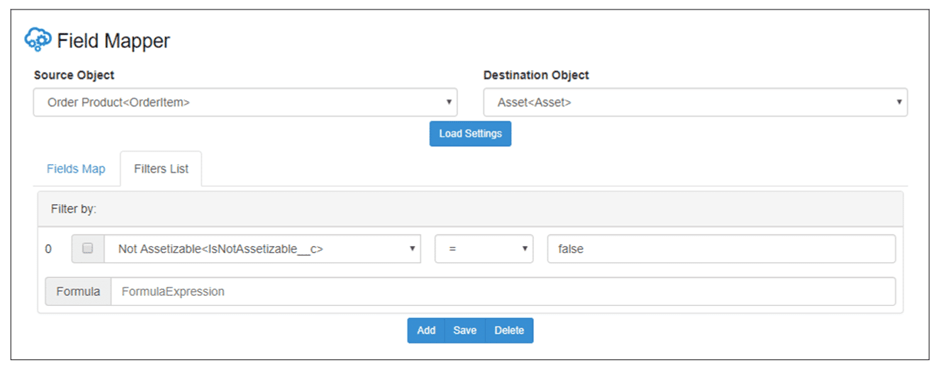
A filter that prevents the assetization of products that are not assetizable can be made using the Field Mapper. The filter, specifically, only specifies assetization when the Not Assetizable option is deselected. You can use filters to restrict source fields according to predefined criteria. Filters are all-inclusive, and formula expressions can be used to specify the conditions. The Field Mapper uses an AND statement to join the filters if a formula is not specified.
Without the use of the Field Mapper, you would need to write transformation code to perform the conversions.
Why set a product as not assetizable?
To summarise, if you do not want to track the commercial value of a customer asset, configure the product as non-assetizable.
Salesforce Industries includes a Not Assetizable field on products as part of the managed package. Order Products, which are sObjects for order line items, don’t have the same field, though. As a result, if necessary, you must manually create the Not Assetizable field on Order Products.
In this scenario, as illustrated in the next section, you add the Not Assetizable field to Order Product. Then, you use the Field Mapper to make sure that during the order-capture process, no assets are created for products that are marked as “Not Assetizable.”
Configuration Details of Not Assetizable Custom Field
The Not Assetizable field is a custom field that you set up on the Salesforce Edit Order Product Custom Field page, where you provide the following values:
- In Field Information:
- Field Label: Not Assetizable
- Field Name: IsNotAssetizable (using Pascal case)
- In Formula Options:
- Formula Return Type: Checkbox
- Not Assetizable (Checkbox) =: vlocity__cmt__Product2Id_r.vlocity_cmt__IsNotAssetizable__c
In the next blog post, I will show you where this Not Assetizable field appears on the product and along with this we will see how to configure the product in Industries CPQ.
Hope this information helps you guys.
Cheers!!!
Mukul Sharma
 vlocitysfdc.com