Are you planning to Install or upgrade the Vlocity package in your Org. If yes then might be you will face this error “Vlocity_cmt too many SOQL queries 201” in CME Upgrade jobs component . Following solution might help you to resolve this error .
ERROR : Vlocity_cmt too many SOQL queries
Solution : One of the solution to resolve this error is to increase the size of the following two batch jobs
- Product attributes processor batch job
- Product hierarchy processor batch job
Steps to Increase the size :
Step 1 : Click on the app launcher and search for Vlocity CMT Administration
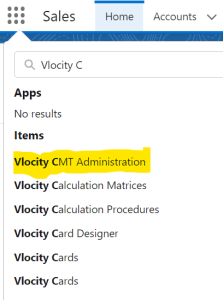
Step 2: Click on Vlocity CMT Administration and open the CMT Administration Configuration window.
Step 3: In Custom settings section click on CPQ Configuration Setup.

Step 4: In search box search for ProductAttributesBatchProcessorSize.

- For ProductAttributesBatchProcessorSize, click on edit icon.
- Change the SETUP VALUE to 500.
- Click Save.
Step 5: Search for ProductHierarchyBatchProcessorSize.

- For ProductHierarchyBatchProcessorSize, click on edit icon.
- Change the SETUP VALUE to 20.
- Click Save.
Step 6: Search for MTSEnabled and set MTSEnabled value to True ,Click Save.
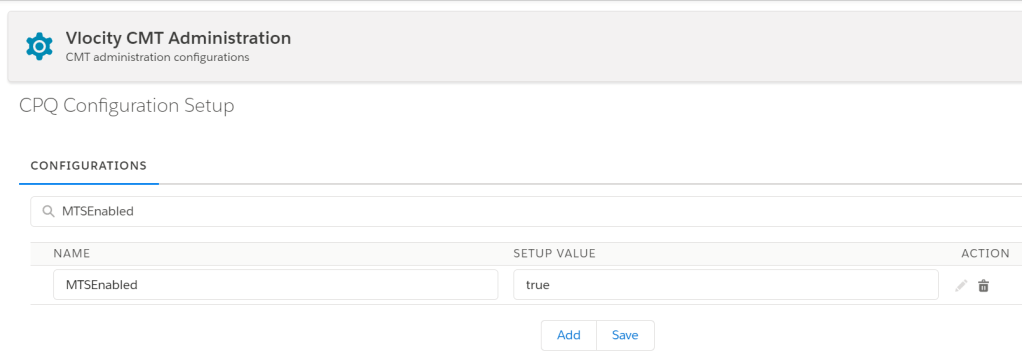
Step 7: Once you done with all these changes than don’t forget to Refresh platform cache.
 vlocitysfdc.com